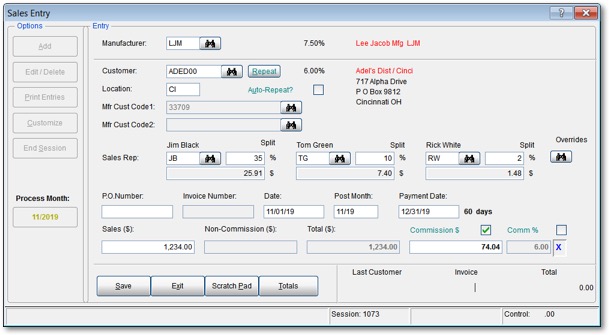
The sales invoice entry screen is where paper invoices are entered.
Easy-to-use screens make data entry a breeze
Sales data received from manufacturers in the form of invoices, commission statements or summary reports is quickly and easily entered into dynaMACS. User-friendly screens simplify data entry and eliminate heavy month-end processing.
System features
- Posting – Post entries to any prior period during the entry process.
- SmartView – Improves speed and reduces data entry errors by only viewing customers that have previously purchased from the manufacturer.
- Alpha look-up – Enter the first few characters of the customer / manufacturer name and select the correct match from the viewer.
- Input validation – Eliminate keying errors with instant confirmation of data entered.
- Manufacturer customer code entry option – Improve entry speed and accuracy by using the manufacturer customer code to identify the customer.
- Master file maintenance – Add or change customers, manufacturers or sales reps during data entry.
- Cross reference sales rep responsibility – Assign territory responsibility to a sales rep based on a customer or manufacturer.
- Automatically calculate commissions – Once the sales amount is entered, dynaMACS automatically calculates the expected commission.
Also: automatic exceptions for special customers and manual overrides for out-of-the-ordinary situations.
- Split commissions – Automatically and among multiple sales reps.
- Daily entry & posting – Abolish month-end crunches with daily entry and posting.
- Always up-to-date – See updated figures anytime during the month.
- Data management – Manage the flow of data with control totals and audit trails. Review on screen or print entries before posting.
- Track running totals – With each invoice entered, dynaMACS keeps track of several running totals including total sales, total commission and average commission percentage.
- Remember the last invoice entered – If you are distracted during an invoice entry session, a glance at the screen reminds you where you stopped. The operator may, at any time, change previous entries.
- View and print reports anytime – Data is available in many reports formats and can be printed anytime during the month.
Data entry is as easy as 1 – 2 – 3
- Identify the manufacturer. Enter a few characters of the manufacturer name and the viewer finds the right manufacturer. Do the same for the customer.
- Validate commission. dynaMACS retrieves the customer’s name, address, assigned sales rep and the normal commission. Commissions and split data may be overridden.
- Enter invoice information. Input only three pieces of data from the paper: sale amount, invoice number, date.
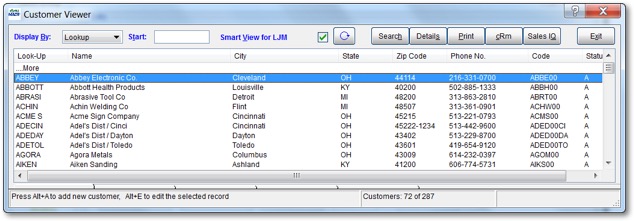
Customer look-up using “SmartView.”
An easy and efficient way to enter sales and commission data and report results
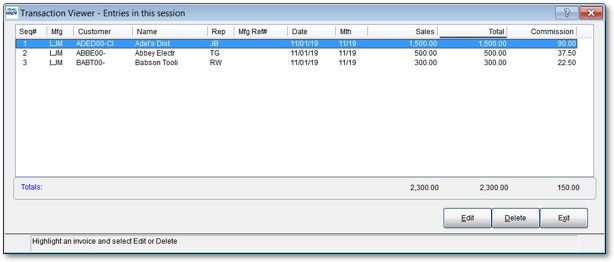
dynaMACS provides on-screen review of entries prior to posting.
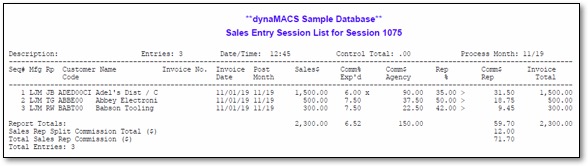
You can also view a printed report, as shown above, prior to posting. After reviewing and making any necessary changes, you can post sessions immediately.
Immediate posting ensures accuracy
Sales and commission entry is virtually error-free, because you check your work before posting a session. Some benefits:
- List entries, either on screen or in a printed report. You choose.
- Make changes before posting the session.
- Post entries daily, if desired.
- Post to any prior session.
- View the entries at a later date using Transaction Viewer.
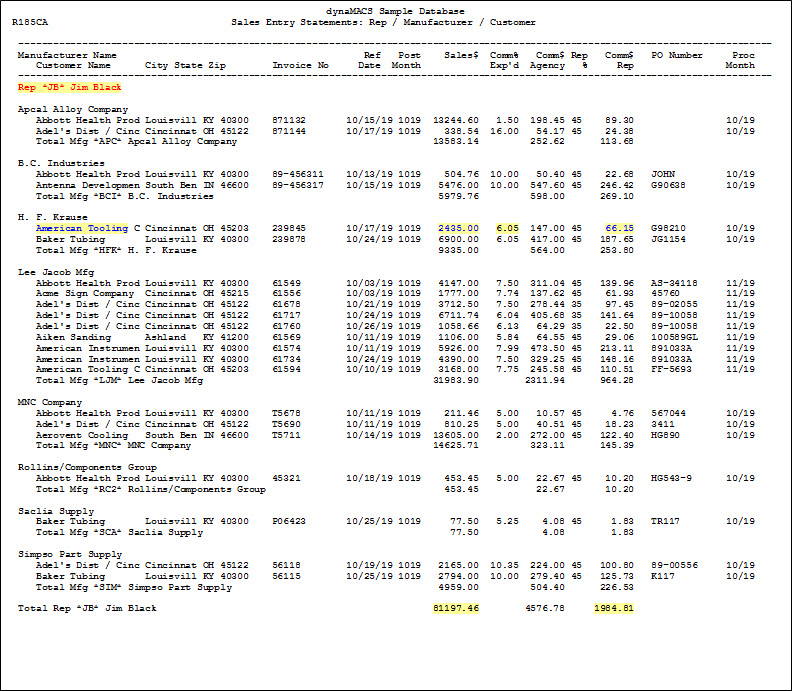
After all of your sessions are entered and posted, commission statements can be printed. A sample is shown below. (Note: If your agency is reconciling commissions using the dynaMACS Commission Reconciliation Module, the sales reps’ commission statement is normally printed from that module.)
How to read this report
Following are some examples of the type of information contained in the statement shown below.
- This shows every invoice that sales rep Jim Black is being paid commission for.
- His total sales are $81,197.46, for a commission pay-out of $1,984.81.